SHUTTERBENCH GALLERY · DESKTOP APP · MACOS

Client galleries without the monthly bill.

Point it at a folder of finished photos. Get a password-protected client gallery — proofing, favorites, downloads — online in about ten minutes. Then never pay for it again.

ONE-TIME $79 · 3 MACHINES · NO SUBSCRIPTION · YOUR PHOTOS NEVER LEAVE YOUR MAC

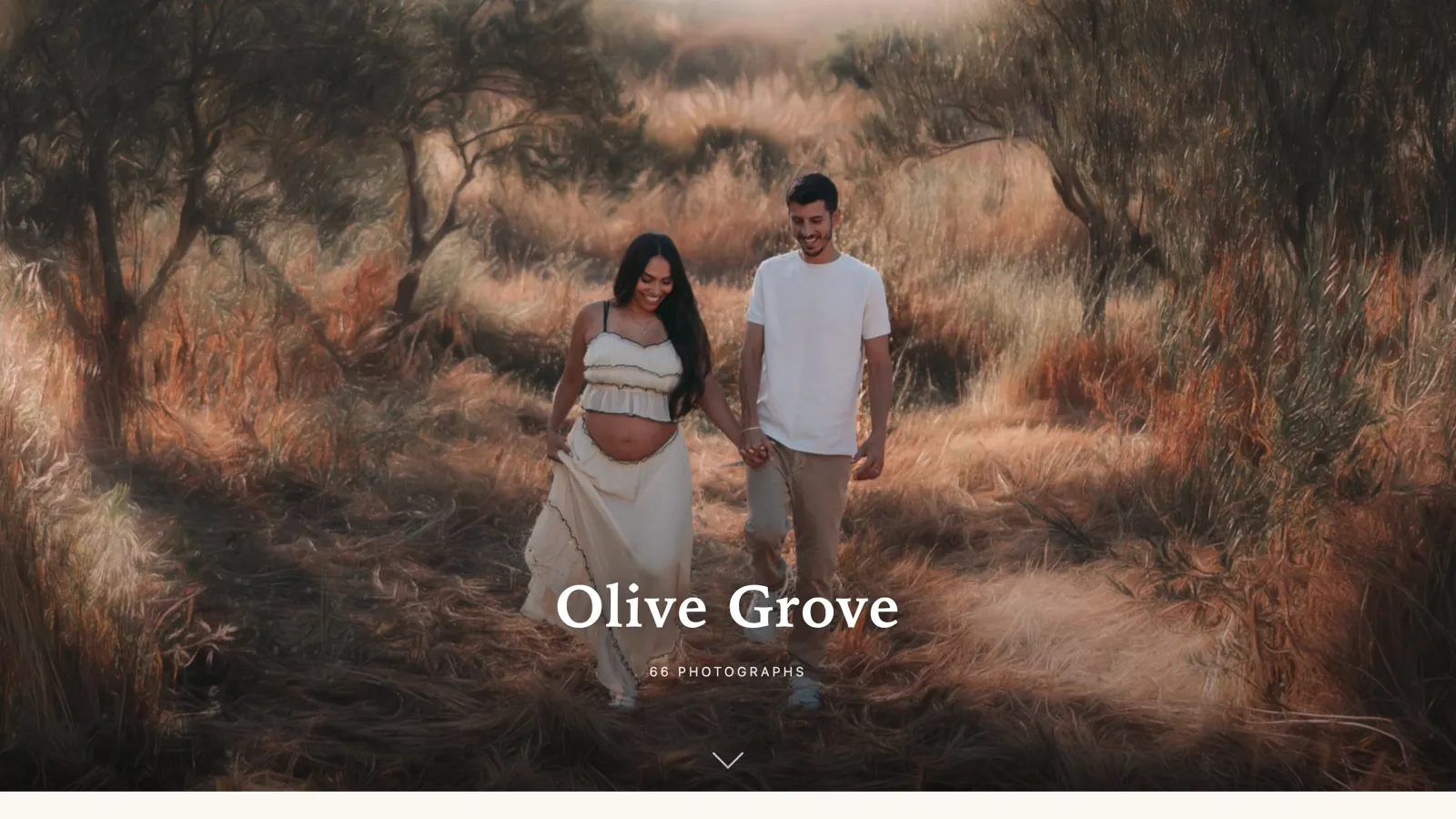
A finished client gallery: a full-bleed cover photograph of a maternity session in an olive grove, the gallery title Olive Grove, and the line 66 photographs.
WHAT YOUR CLIENT OPENS · 66 PHOTOGRAPHS · EDITORIAL LOOK
The same gallery scrolled to the grid: rows of proofing thumbnails with Slideshow and Download all in the header.
PROOFING GRID · SLIDESHOW · DOWNLOAD ALL
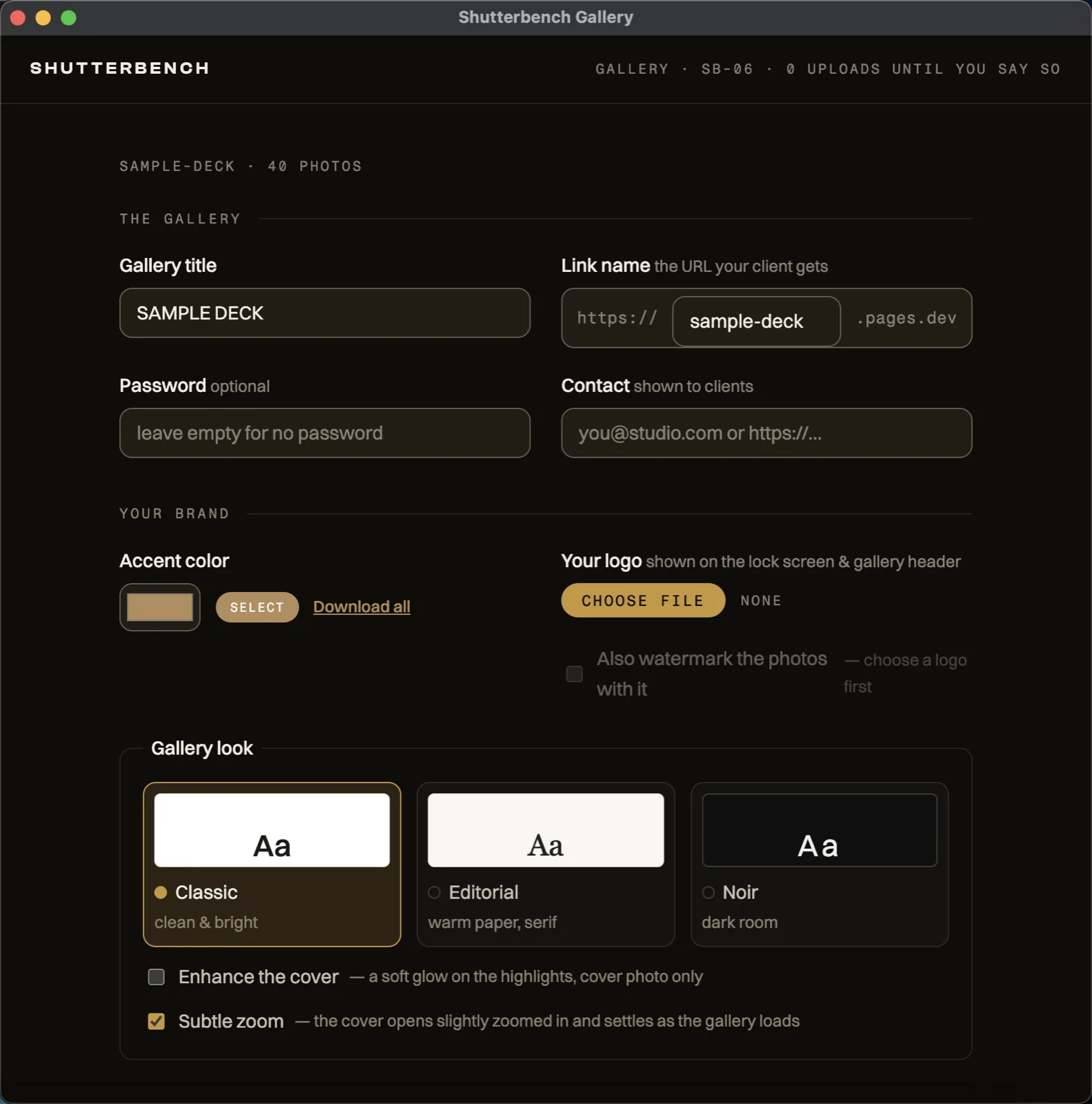
The Shutterbench Gallery setup screen: gallery title, link name, optional password, contact, accent colour, three gallery looks, and what clients get.
WHAT YOU SEE · TITLE · LINK · PASSWORD · LOOK · DOWNLOADS · THEN BUILD
THE ARITHMETIC

You are renting a link.

Every client gallery service charges you monthly for the same thing: a page with your photos on it and a password box. Miss a payment and the galleries your clients bookmarked go dark — work you delivered years ago, held behind a card that expires.

Gallery is a tool, not a tenancy. It builds the gallery on your machine and puts it on hosting that belongs to you, under your own free Cloudflare account. At $15 a month, a subscription passes $79 before its sixth invoice. This one has no second invoice.

WHAT IT DOES

Six things, done properly.

01 · PUBLISH

One click puts it online.

No FTP, no VPS, no Docker, no dragging files into a dashboard. Connect your Cloudflare account once — the app builds the token link for you — and every gallery after that is one button. Re-run it later and the same URL updates in place.

02 · PROOFING

Favorites come back to you.

Clients star what they want, with an optional limit so “pick 30” means 30. Their selection comes back as a plain filename list you can paste straight into a Lightroom filter. No round trip through anyone's server.

03 · PRIVACY

EXIF stripped, GPS gone.

Delivered photos get a lossless metadata strip by default, so a wedding at a private address does not ship its coordinates with it. Keep EXIF if you want it — the app tells you plainly what that includes.

04 · DELIVERY

Downloads on your terms.

Full resolution, web size, or off entirely — your call, per gallery. Clients can pull single frames or zip their whole selection, and the zip is built in their browser, not billed to you.

05 · BRANDING

Your studio, not ours.

Logo, accent colour, contact link, optional watermark, and three looks — Classic, Editorial, Noir. The finished gallery carries your name. Shutterbench does not put a badge on your client's screen.

06 · REACH

Six languages, right-to-left included.

The gallery your client opens speaks English, Spanish, German, French, Portuguese or Hebrew — with proper right-to-left layout, not a mirrored afterthought.
THE WHOLE JOB

Folder in. Link out.

  1. STEP 01

    Point it at a folder.

    Finished JPEGs, straight out of your export. Nothing to import, no catalog to maintain.

  2. STEP 02

    Set the details, build.

    Title, password, downloads, favorites, look, language. Every one of them optional and already sensible.

  3. STEP 03

    Put it online, send the link.

    One button deploys it. The app hands you the address and password ready to paste into the email.

The long version, with every switch explained: read the setup guide →

DOWNLOAD · MACOS 11+

Try it on 25 photos, free.

The download is the full app. Without a licence it builds galleries up to 25 photos and wears a small trial badge — every other part works, including a real deploy to your own hosting. Activate a key and the cap is gone.

SIGNED AND NOTARIZED BY APPLE · NO INSTALLER TRICKS · ~130 MB

Download for Apple siliconDownload for Intel Macs

M1, M2, M3 or newer? Take the Apple silicon build. Mac from 2020 or earlier? Intel. Not sure — click the Apple menu, About This Mac, and read the Chip line.

THE PRICE

$79. Once. That is the whole pricing page.

  • One payment, no subscription, ever. There is no renewal date and nothing to cancel.
  • Three machines per licence. Desk, laptop, and the spare.
  • Your photos never leave your Mac except in the deploy you click, to hosting you own.
  • If it does not work on your setup, we fix it or refund you in full.
Buy Shutterbench Gallery — $79

CHECKOUT BY LEMON SQUEEZY · APPEARS AS LEMSQZY* POSTPILOTS ON YOUR STATEMENT

Questions before you buy

Where do my photos go?

Nowhere you did not choose. The app reads the folder on your Mac, builds the gallery on your Mac, and the only upload is the one you click — straight into your own Cloudflare account. Shutterbench has no server in the loop and never sees a photo.

What does the hosting cost?

Nothing, in normal use. Galleries deploy to Cloudflare Pages under your own free account. You connect it once with a token the app helps you create, and the free tier covers client galleries comfortably.

Is it really pay-once?

Yes. $79, one time, no renewal. There is nothing to expire and no subscription to cancel — if you stop paying attention to us entirely, your copy keeps working and your galleries stay online.

How many computers can I use it on?

Three. One licence key activates on up to three machines — desk, laptop, and the spare.

Can I try it before buying?

Yes. Without a licence the app runs in trial mode: everything works end to end, including a real deploy, but a gallery is capped at 25 photos and carries a small trial badge. Activate a key and the cap disappears.

How strong is the password?

Honest answer: it is a lock on a garden gate, not a bank vault. The gallery manifest is encrypted, and photo URLs only exist inside it, so search engines and casual snooping are shut out. Anyone your client forwards the password to can still get in. Do not use it for material that would hurt you if it leaked.

Do clients need an account to see their photos?

No. They open a link, type the password if you set one, and that is it. No signup, no app, no “create a free account to view”.

Can I use my own domain?

Not from inside the app yet — but you can do it yourself today, in about two minutes. Galleries land on a yourgallery.pages.dev address that you choose the name of, and because each one deploys into your Cloudflare account, you can point emma.galleries.yourstudio.com at it from the Cloudflare dashboard. The guide walks through the four clicks. It is per gallery — each gallery is its own project — which is why doing it in one click from the app is a later version.

Is there a Windows version?

Not yet. Version 1 is macOS 11 or newer, Apple silicon and Intel. If you want the Windows build, join the list below and you will hear when it exists.

What if it does not work on my machine?

Write to [email protected]. We will either fix it or refund you in full.